

The Shein Free Trial Center offers users an opportunity to test selected products without paying for the items. With up to three applications allowed per week, participants can explore different categories and request products available in each campaign.
Getting approved is only the beginning. Selected participants must follow the delivery process, evaluate their products and submit reviews within 10 days. Knowing how each stage works can help you avoid mistakes and complete your participation correctly.
⚠️ This independent guide is based on publicly available information about the Shein Free Trial Center. We have no commercial affiliation with the brand, do not handle applications or collect personal information, and cannot influence selection outcomes. Approval is never guaranteed.
🔎 Why Are Some Free Trial Applications Unsuccessful?
The Free Trial Center receives requests from users interested in testing different products, but the number of available places is limited. Not every application can be approved, and certain mistakes may also affect the outcome.
Some issues worth checking before applying include:
- Incomplete profiles: Missing personal information or outdated account details.
- Regional address mismatches: Delivery information that does not correspond to the country of the active store.
- Late applications: Submitting requests after a campaign has already been available for some time.
- Insufficient product feedback: Reviews that lack useful descriptions or original photographs.
Building a consistent participation record starts with taking care of these details. Keep your profile complete, check new opportunities regularly and give each product review the attention it requires.
📌 A complete account, accurate delivery details and well-prepared reviews help you avoid preventable participation problems.
🛍️ Understanding the Shein Free Trial Program
The Free Trial Center works as a product-testing initiative within Shein. Instead of purchasing an eligible item, selected participants receive the product at no cost and agree to share an honest evaluation after trying it.
The process connects two important activities:
- Product selection: Users browse the available listings and submit applications for the items they want to test.
- Product evaluation: Those who receive approval get the selected product and complete a review based on their actual experience.
New products and application opportunities appear throughout different campaign periods. However, available spaces are limited, and previous participation does not guarantee another approval.
Your account activity, application timing and previous reports are all relevant aspects to keep in mind when participating in future rounds.
⚠️ Receiving a product through the program also means accepting the responsibility to submit the required feedback.
🛒 Which Products Can You Find in the Free Trial Catalog?
The available selection goes beyond clothing. Depending on the current listings, users may find products from different areas of the Shein store, including personal care, fashion accessories and home essentials.
Categories You May Find on the Dashboard
- Fashion and Apparel: Dresses, T-shirts, jackets, jeans and seasonal clothing collections.
- Beauty and Personal Care: Skincare products, makeup and everyday hygiene essentials.
- Fashion Accessories: Jewelry, handbags, belts and other items designed to complement different looks.
- Home and Living: Decorative objects, storage organizers and practical household accessories.
📌 Product availability changes as new campaigns appear. Check the current catalog to see which categories and items are accepting applications.
1️⃣ Access the Free Trial Center
Start by signing in to your existing Shein account through the website or mobile application. Once inside your profile, locate the section dedicated to product-testing opportunities.
On mobile, the usual navigation path is:
Profile → More Services → Other Services → Free Trial Center
Open the section to browse the products listed for the current application period. You can then explore the available options and check which items you would like to request.
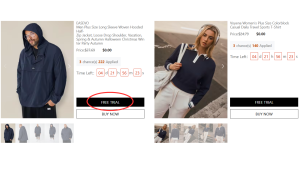
📌 Find the Free Trial Center through your account’s services panel.
2️⃣ Apply for Up to 3 Products Per Week
The platform sets a maximum of three product requests per weekly cycle. Any unused application opportunities expire instead of being added to the following week’s allowance.
After finding an interesting item, open its listing and complete the application process:
- Select the product you want to test.
- Choose the appropriate size, if applicable.
- Check the delivery address registered in your account.
- Complete the required information and submit the request.
Your shipping details deserve special attention. The address must belong to the country or region served by the active Shein store. Information that does not meet this requirement can lead to an unsuccessful application.
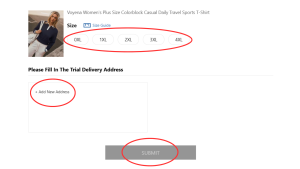
📌 Confirm the selected size and delivery location before sending your application.
3️⃣ Monitor Your Application Decisions
Once your requests have been submitted, the next step is checking whether they were accepted.
The selection process generally takes around one week. To follow the outcome, access My Free Trial / My Applications through your account.
The dashboard displays the result using two main status labels:
- ✅ Approved: Your request was accepted, and the product shipment can proceed.
- ❌ Failed: Your application was not selected during that campaign.
Make a habit of revisiting this section instead of relying only on the initial submission. This way, you can identify completed decisions and follow the progress of your requests.
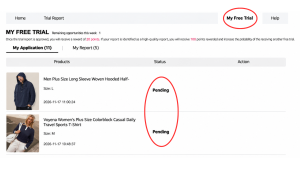
📌 Use My Applications to check approvals and unsuccessful requests in one place.
4️⃣ Submit Your Product Review Within 10 Days
Once your package arrives, take time to examine the product before preparing your report. Consider its appearance, construction, material, fit, comfort and durability, depending on the type of item received.
The review should reflect your actual experience and include photographs that clearly show the product. For clothing, a full-body picture accompanied by two close-up images can help illustrate important details.
After preparing your feedback, submit it through the corresponding option and follow its progress in My Report.
Remember the deadline: participants generally have 10 days after delivery to complete this requirement.
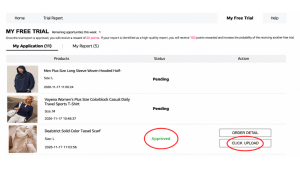
📌 Include original photographs and specific observations about the item. Submit your report before the 10-day period expires.
5️⃣ Check Your Report Status and Available Points
After sending your product evaluation, visit My Report to confirm that the submission has been registered and check its assessment.
The program generally provides points according to the report’s classification:
- Approved Report: 20 points credited to your account.
- High-Quality Report: An additional 100 points for reviews receiving this classification.
These rewards recognize the contribution made through product evaluations and can be used toward purchases according to the platform’s applicable conditions.
⚠️ Points do not guarantee approval in upcoming campaigns. They represent rewards associated with your review activity, not additional application credits.
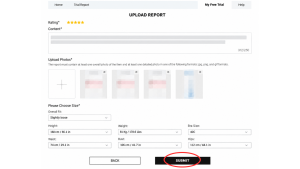
📌 Check the report classification and verify which rewards have been added to your account.
6️⃣ Correct Failed Reports Using the Rewrite Option
A report displaying Failed may still have an opportunity for correction. When the platform makes this feature available, participants can use Rewrite to update their original submission.
Access My Report, locate the unsuccessful evaluation and check whether the correction option appears. If available, revisit your comments and improve the information before submitting another version.
Pay attention to these details:
- Add missing observations about the item’s quality and construction.
- Explain the fit, fabric, comfort or finishing in greater detail.
- Replace photographs that are unclear or poorly lit.
- Make sure the revised submission follows the platform’s requirements.
The correction opportunity generally applies to one additional attempt, so review everything carefully before sending the updated report.
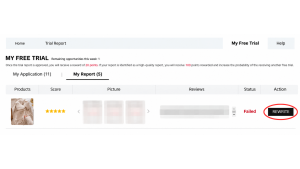
📌 Look for Rewrite in My Report when a correction is available and check the applicable deadline.
How to Structure a Valuable Product Review
A useful evaluation should give other shoppers a realistic idea of what they can expect from the product. Instead of relying on short comments, describe specific characteristics you noticed while testing the item.
Include these elements in your report:
✅ Balanced observations: Mention the product’s positive aspects as well as details that could be improved.
✅ Material and sizing information: Describe fabric quality, measurements, fit and comfort during use.
✅ Original photographs: Add well-lit pictures taken by you, showing the unpacked product from useful angles.
✅ Practical feedback: Share details about functionality, appearance and everyday use that could help other shoppers.
❗ Points Breakdown: An approved report generally earns 20 points, while a review classified as High-Quality Report can receive an additional 100 points for purchases under the platform’s applicable conditions.
Actions That May Reduce Your Selection Chances
Certain habits can create unnecessary problems throughout the application process. Pay attention to these mistakes and avoid repeating them:
❌ Leaving personal information incomplete or failing to update body measurements in your account.
❌ Registering a shipping address that does not correspond to the active store’s region.
❌ Waiting too long to apply after new weekly campaigns become available.
❌ Submitting short reviews without meaningful descriptions or original photographs.
❌ Allowing the 10-day period for the required product evaluation to expire.
❌ Overlooking the Rewrite feature when a Failed report is eligible for correction.
❌ Staying inactive for long periods and accessing the app only when new benefits become available.
A consistent participation routine makes a difference: keep your profile complete, check new listings, confirm your delivery information and submit detailed reviews within the required period.
📋 Key Shein Free Trial Conditions to Remember
Before applying, review the main requirements associated with the program:
- Weekly application limit: Up to three product requests per cycle. Unused opportunities do not carry over.
- Eligible delivery address: Your registered location must match the country or region of the active Shein store.
- Shipping expenses: Standard shipping costs are covered by the company, although customs fees may apply depending on the destination.
- Review submission: Product evaluations must generally be completed within 10 days of package arrival.
- Failed reports: An additional correction opportunity through Rewrite may be available.
- Account restrictions: Providing false information or operating multiple accounts on one device can lead to a permanent block.
- Participation history: Late or missing reviews may negatively affect your chances in subsequent campaigns.
⚠️ Always check the current campaign conditions. The brand can modify program requirements, deadlines and rewards.
❓ Frequently asked questions
Do I have to pay for product shipping?
No. Shein covers standard shipping expenses for selected participants. However, customs duties and other local charges may apply depending on the destination country’s regulations.
How many products can I request at once?
You can submit applications for up to three different products per weekly cycle. Unused opportunities expire and cannot be saved for the following week.
What happens if my product review is rejected?
Your submission may display a Failed status in My Report. When the Rewrite option is available, you can update the text, add missing product details and replace unclear photographs before resubmitting.
Do I have to return the products after completing my review?
No. Under the program’s standard conditions, participants generally keep the products they receive after submitting and validating the required evaluation. However, check the specific terms of each campaign before participating.
Popular products may have limited application spaces. Checking the dashboard when new campaigns become available, submitting requests carefully and completing every review on time can help you stay organized throughout the program.
🌐 Visit the Official Shein Free Trial Center Dashboard
Explore the current catalog, choose the products that interest you and follow your applications directly through your account.
You will be redirected to Shein’s official Free Trial environment.
Reference source and help channel: Shein Free Trial Help Center
Important Note: This website provides informational and educational content only and is not affiliated with Shein or any other brand mentioned. We never request personal information, passwords, payments or transactions. Shein determines the program’s selection criteria, deadlines and rewards, which may change at any time.